Translation
This post is also available in
Simplified Chinese.
Introduction to mruby
mruby is a lightweight implementation of Ruby. It works much like CPython: Ruby source is compiled to bytecode, which is then interpreted by a virtual machine.
I first encountered mruby bytecode in the DEF CON 2021 Finals. The barb-metal challenge used mruby bytecode to run simulated IoT firmware. A few months later, another mruby reversing challenge appeared in the Fifth Space online competition, so I decided to summarize the characteristics of mruby bytecode.
mruby implements a register-based virtual machine. All opcodes are listed in opcode.h. Its bytecode assigns registers in the order of function arguments, local variables, and temporary registers. Clone and build the mruby source; bin/mirb is an interactive mruby interpreter. Starting it with -v prints the bytecode generated by the interpreter, which makes the format easier to understand.
 1
 2
 3
 4
 5
 6
 7
 8
 9
10
11
12
13
14
15
16
17
18
19
20
21
22
23
24
25
26
27
28
29
30
31
32
33
34
35
36
37
38
39
| mruby 2.1.0 (2019-11-19)
> def f(a,b)
* c=a+b
* d=a-b
* return c*d
* end
...
irep 0x55c104345310 nregs=4 nlocals=2 pools=0 syms=1 reps=1 iseq=14
local variable names:
R1:_
file: (mirb)
13 000 OP_TCLASS R2
13 002 OP_METHOD R3 I(0:0x55c104346290)
13 005 OP_DEF R2 :f
13 008 OP_LOADSYM R2 :f
13 011 OP_RETURN R2
13 013 OP_STOP
irep 0x55c104346290 nregs=9 nlocals=6 pools=0 syms=0 reps=0 iseq=36
local variable names:
R1:a
R2:b
R3:&
R4:c
R5:d
file: (mirb)
13 000 OP_ENTER 2:0:0:0:0:0:0
14 004 OP_MOVE R6 R1 ; R1:a
14 007 OP_MOVE R7 R2 ; R2:b
14 010 OP_ADD R6
14 012 OP_MOVE R4 R6 ; R4:c
15 015 OP_MOVE R6 R1 ; R1:a
15 018 OP_MOVE R7 R2 ; R2:b
15 021 OP_SUB R6
15 023 OP_MOVE R5 R6 ; R5:d
16 026 OP_MOVE R6 R4 ; R4:c
16 029 OP_MOVE R7 R5 ; R5:d
16 032 OP_MUL R6
16 034 OP_RETURN R6
|
The lower bytecode listing shows that the registers used by an mruby function are assigned to specific variables. R1-R2 hold arguments a and b, R4-R5 hold local variables c and d, and R6-R7 are temporary registers.
For instructions with multiple operands, mruby first places the operands in consecutive registers and encodes only the first register in the bytecode. For example, 032 OP_MUL R6 actually consumes R6 and R7 and always stores their product in R6. In the declaration of function f, 002 OP_METHOD R3 I(0:0x55c104346290) places the function pointer in R3. The following 005 OP_DEF R2 :f declares the function pointer in R(2+1), or R3, under the name held by R2: :f. With this convention understood, we can begin reversing mruby bytecode.
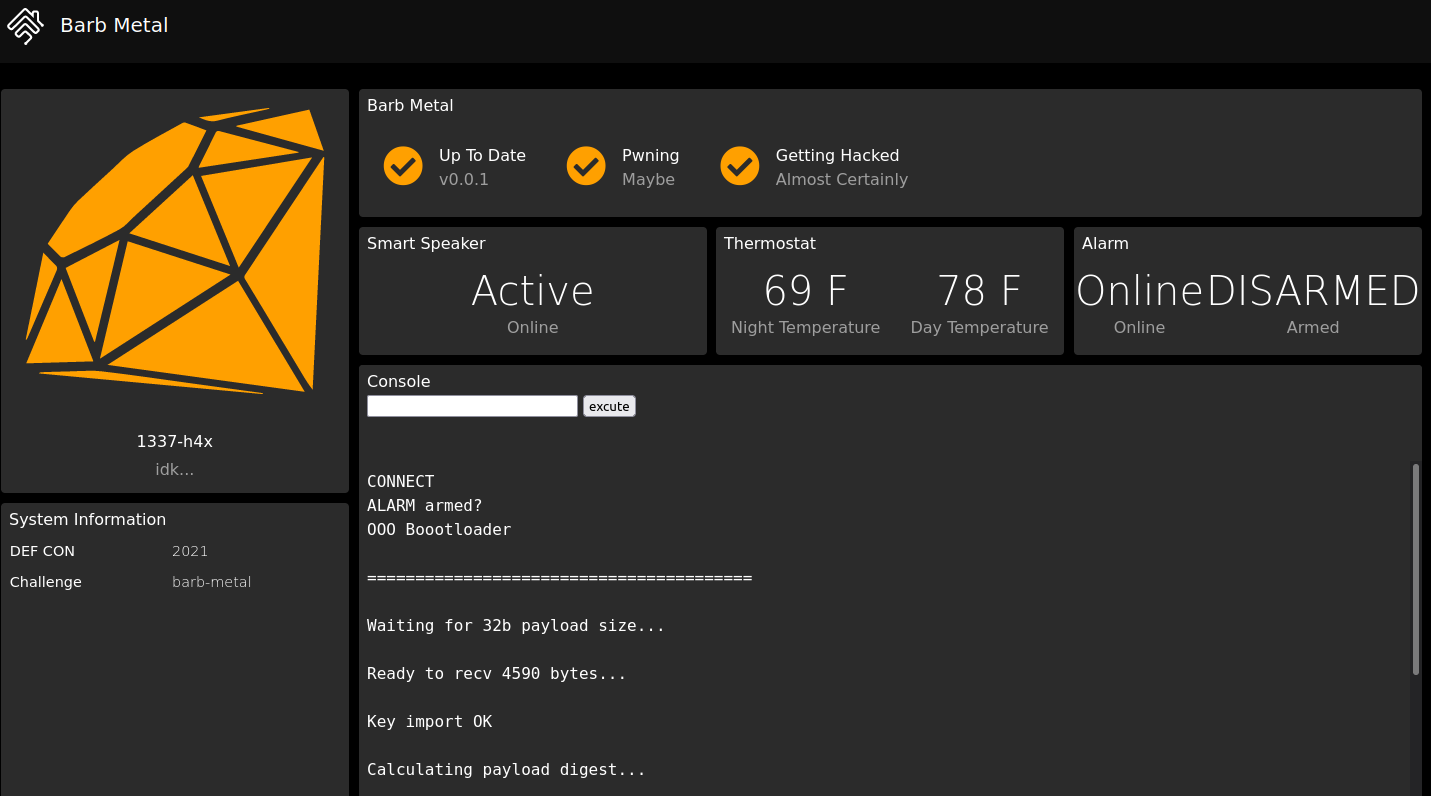
This was an attack-and-defense challenge from the DEF CON 29 Finals; an archive is available at archive.ooo. It used mrubyc, another mruby interpreter implementation, to run a simulated IoT device with Alarm, Thermostat, Speaker, and other components. Each component accepted different commands. The Thermostat, for example, stored temperature data that could be read or written with commands such as THERM read day friday and THERM set night monday 90.
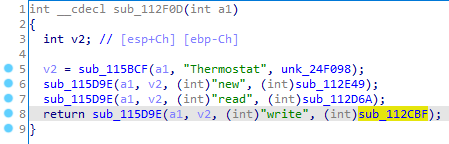
Reversing the challenge’s service binary shows that the Alarm, Thermostat, and Speaker components are implemented in C and registered as member functions of Ruby objects.
The challenge’s payload.bin contains mruby bytecode. After the first 260 bytes of signature data, its magic bytes are RITE0006, corresponding to mruby v2.1.0. Build that version and run mruby -v -b payload.bin to dump the bytecode.
The following excerpt from set_therm handles the THERM set command:
 1
 2
 3
 4
 5
 6
 7
 8
 9
10
11
12
13
14
15
16
17
18
19
20
21
22
23
24
25
26
27
28
29
30
| 267 OP_MOVE R7 R5 ; R5:date
270 OP_GETIV R8 @dayofweek
273 OP_SEND R8 :size 0
277 OP_GT R7
# R7 is the input date and R8 is the length of dayofweek; this checks its upper bound.
# OP_GT R7 implicitly compares against R8.
279 OP_JMPNOT R7 306
# If R7 < R8, jump to 306. Otherwise continue downward and return.
283 OP_LOADSELF R7
285 OP_STRING R8 L(5) ; "INVALID date "
288 OP_MOVE R9 R5 ; R5:date
291 OP_STRCAT R8
293 OP_STRING R9 L(3) ; ""
296 OP_STRCAT R8
298 OP_SEND R7 :putsDBG 1
302 OP_LOADNIL R7
304 OP_RETURN R7
# Print an out-of-bounds message.
# OP_SEND R7 :putsDBG 1 implicitly takes R8 as its argument.
306 OP_GETIV R7 @therm
309 OP_MOVE R8 R4 ; R4:time
312 OP_MOVE R9 R5 ; R5:date
315 OP_MOVE R10 R6 ; R6:temp
318 OP_SEND R7 :write 3
322 OP_RETURN R6 ; R6:temp
# Validation passed; call the device function.
# In OP_SEND R7 :write 3, R7 is the receiver and R8-R10 are the three arguments.
|
In mruby bytecode, OP_GETIV R7 @therm obtains the Thermostat object and places it in R7. OP_SEND R7 :write 3 calls that object’s write method with the values in the next three registers, R8-R10. Here, write is the Thermostat write operation registered from C (sub_112CBF).
Commands are sent to the service, validated by the mruby program, and then passed to C functions that perform the requested operations. The challenge permits patches only to the mruby bytecode, so the goal is to repair vulnerabilities in its argument validation.
Reversing reveals that the first argument to THERM set can be day/night or the numbers 0/1, while the weekday argument can be a number from 0 through 6. The bytecode above checks only date < dayofweek.size, meaning that the weekday must be less than 7, but never checks its lower bound. THERM set 0 -addr value can therefore perform an out-of-bounds write.
Likewise, in the get_therm function used by THERM get:
 1
 2
 3
 4
 5
 6
 7
 8
 9
10
11
12
13
14
15
16
17
18
19
20
21
22
| 238 OP_MOVE R6 R5 ; R5:date
241 OP_LOADI_0 R7
243 OP_LT R6
245 OP_JMPIF R6 256
# Reject date if it is less than zero.
249 OP_MOVE R6 R4 ; R4:time
252 OP_LOADI_1 R7
254 OP_GT R6
256 OP_JMPNOT R6 273
# Reject time if it is greater than one.
260 OP_LOADSELF R6
262 OP_STRING R7 L(4) ; "INVALID date"
265 OP_SEND R6 :putsDBG 1
269 OP_LOADNIL R6
271 OP_RETURN R6
273 OP_GETIV R6 @therm
276 OP_MOVE R7 R4 ; R4:time
279 OP_MOVE R8 R5 ; R5:date
282 OP_SEND R6 :read 2
286 OP_RETURN R6
|
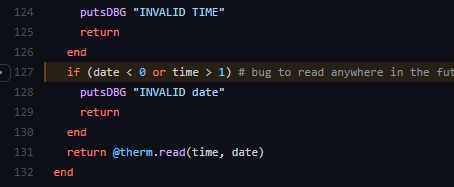
The date validation has a lower bound but no upper bound, allowing an out-of-bounds read. The source code, published after the contest, confirms that this bug was intentional.
The Alarm and Speaker components contain similar out-of-bounds reads and writes. Since mruby is used only to validate arguments, exploitation after this point becomes conventional heap exploitation, which is beyond the scope of this reversing discussion.
Case Study: Fifth Space Online Competition — babyruby
Encountering mruby again was unexpected. Thanks to the DEF CON experience, babyruby went smoothly, and I was fortunate enough to be the only solver in the contest.
The supplied bytecode begins with RITE0200, corresponding to mruby v3.0.0. Build that version, run it, and dump the bytecode. The program’s main function appears at the bottom and first checks the flag{xxxx} format, with 32 bytes inside the braces.
Looking further through the bytecode reveals several interesting functions:
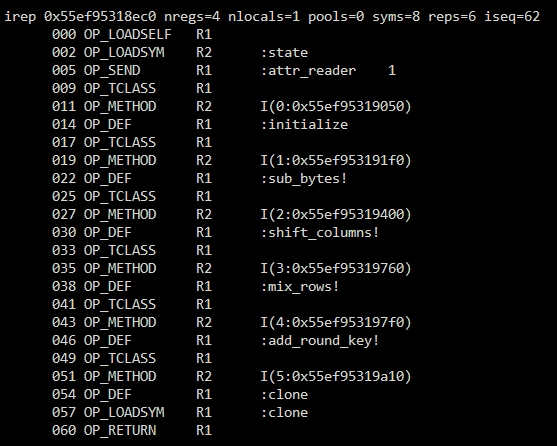
The last four operations are clearly AES building blocks, suggesting that the challenge uses AES. I therefore began looking for the ciphertext and key. The ciphertext comparison is at the end of the program:
 1
 2
 3
 4
 5
 6
 7
 8
 9
10
11
12
13
14
15
16
17
18
19
20
21
22
23
24
25
26
27
28
29
30
31
32
33
34
35
36
37
38
39
40
41
42
43
44
45
46
47
48
49
50
51
52
53
54
55
56
57
58
59
| 1796 OP_MOVE R10 R14 ; R10:wanted
1799 OP_JMP 2065
# This is the start of a for loop; first jump to the check of loop variable i.
1802 OP_GETCONST R14 :Cipher
1805 OP_SEND R14 :new 0
1809 OP_MOVE R11 R14 ; R11:cipher
1812 OP_MOVE R14 R3 ; R3:content
1815 OP_MOVE R15 R4 ; R4:i
1818 OP_SEND R14 :[] 1
# R14 = content[i]
1822 OP_MOVE R15 R3 ; R3:content
1825 OP_MOVE R16 R4 ; R4:i
1828 OP_ADDI R16 16
1831 OP_SEND R15 :[] 1
1835 OP_ADD R14 R15
...
2011 OP_MOVE R12 R14 ; R12:cc
# R14 += content[i+16]. Several similar array accesses are omitted below.
# Ultimately, content[i,i+8,i+16,i+24] are expanded into a 14-byte string in cc.
2014 OP_MOVE R14 R11 ; R11:cipher
2017 OP_MOVE R15 R12 ; R12:cc
2020 OP_STRING R16 L(2) ; c*
2023 OP_SEND R15 :unpack 1
2027 OP_SEND R14 :hash 1
2031 OP_MOVE R13 R14 ; R13:output
# output=cipher.hash(cc.unpack("c*"))
# Unpack cc into bytes, then pass those bytes to cipher.hash.
2034 OP_MOVE R15 R10 ; R10:wanted
2037 OP_MOVE R16 R4 ; R4:i
2040 OP_SEND R15 :[] 1
# wanted = R4[i]; R4 is the comparison target explained below.
2044 OP_SEND R14 :!= 1
2048 OP_JMPNOT R14 2056
2052 OP_LOADF R14
2054 OP_RETURN_BLK R14
# if (output != wanted) return false.
2056 OP_MOVE R14 R4 ; R4:i
2059 OP_ADDI R14 1
2062 OP_MOVE R4 R14 ; R4:i
# i = i + 1
2065 OP_MOVE R14 R4 ; R4:i
2068 OP_MOVE R15 R3 ; R3:content
2071 OP_SEND R15 :length 0
2075 OP_LOADI_4 R16
2077 OP_DIV R15 R16
2079 OP_LT R14 R15
2081 OP_JMPIF R14 1802
# if (i < content.length/4) goto 1802.
# i runs from 0 to content.length/4, processing four bytes per iteration.
2085 OP_LOADT R14
2087 OP_RETURN R14
# Return true: the flag is correct.
|
The challenge divides the 32-byte input into eight groups. Each four-byte group is expanded to 14 bytes, processed by cipher.hash, and compared with a value in R4. R4 is an 8-by-64 array statically encoded in the mruby bytecode and can be extracted directly.
cipher.hash maps 14 bytes to 64 bytes. At first I assumed it was AES encryption, but AES-128 has nine complete rounds followed by a final round without MixColumns. I could not find a final round containing only SubBytes, ShiftRows, and AddRoundKey, so the AES hypothesis did not fit. The name cipher.hash, the 64-byte output, and several padding operations instead point to the Whirlpool hash function. Whirlpool constructs a hash from the four AES-style operations and uses an 8-by-8 substitution-permutation state. Other algorithms using AES components include ARIA, SM4, Rijndael-192, and Rijndael-256; all of them can be accelerated with Intel AES-NI.
Because each round consumes only four input bytes, we can brute-force each hash stored in R4 to recover its input:
 1
 2
 3
 4
 5
 6
 7
 8
 9
10
11
12
13
14
15
16
17
18
19
20
21
22
23
24
25
26
27
28
29
30
31
32
33
34
35
36
37
38
39
40
41
42
43
44
45
46
47
48
49
50
51
52
53
54
55
56
57
58
59
| #include <openssl/whrlpool.h>
#include <stdio.h>
#include <string.h>
const unsigned char h1[] = {
16, 87, 130, 164, 79, 211, 145, 230, 203, 8, 8, 147, 105, 87, 47,
... // R4 array extracted from the bytecode
};
int main() {
int a, b, c, d;
int i;
char flag[32];
char buf[14];
memset(flag, 0xff, 32);
unsigned char md[64];
for (i = 0; i < 8; i++) {
printf("%d\n", i);
for (a = 0; a < 80; a++) {
for (b = 0; b < 80; b++) {
for (c = 0; c < 80; c++) {
for (d = 0; d < 80; d++) {
buf[0] = a;
buf[1] = c;
buf[2] = c;
buf[3] = b;
buf[4] = d;
buf[5] = c;
buf[6] = a;
buf[7] = c;
buf[8] = a;
buf[9] = c;
buf[10] = b;
buf[11] = c;
buf[12] = d;
buf[13] = c;
WHIRLPOOL(buf, 14, md);
if (memcmp(md, h1 + 64 * i, 64) == 0) {
printf("%d good\n", i);
flag[i] = a;
flag[i + 8] = b;
flag[i + 16] = c;
flag[i + 24] = d;
goto done;
}
}
}
}
}
done:
printf("%d done\n", i);
}
for (i = 0; i < 32; i++) {
printf("0x%02x,", flag[i]);
}
return 0;
}
//[0x16, 0x27, 0x00, 0x35, 0x32, 0x16, 0x18, 0x15, 0x22, 0x21, 0x03, 0x1a, 0x1e, 0x1d, 0x3b, 0x1a,
// 0x2d, 0x38, 0x0e, 0x03, 0x28, 0x08, 0x28, 0x0e, 0x2e, 0x31, 0x39, 0x3e, 0x04, 0x1d, 0x15, 0x23]
|
That is not the whole challenge: the brute-force result is only the array passed to cipher.hash. Before hashing, the program transforms the input further:
 1
 2
 3
 4
 5
 6
 7
 8
 9
10
11
12
13
14
15
16
17
18
19
20
21
22
23
24
25
26
27
28
29
30
31
32
33
34
35
36
37
38
39
40
41
42
43
44
45
46
47
48
49
50
51
52
53
54
55
56
57
58
59
60
61
62
63
64
65
66
67
| 081 OP_MOVE R15 R3 ; R3:content
084 OP_SEND R15 :length 0
088 OP_SUBI R15 1
091 OP_RANGE_INC R14
# R14 = content[0:length-1]; OP_RANGE_INC creates a range using R15.
093 OP_BLOCK R15 I(0:0x55d31260ff20)
096 OP_SENDB R14 :each 0
# OP_BLOCK loads a lambda into R15.
# Apply it to every element of R14, similarly to Python's map.
100 OP_LOADI_1 R6 ; R6:step
102 OP_LOADI_0 R4 ; R4:i
104 OP_LOADI_0 R7 ; R7:lst
# step=1, i=0, lst=0; initialize a complex loop.
106 OP_MOVE R14 R4 ; R4:i
109 OP_MOVE R15 R6 ; R6:step
112 OP_ADD R14 R15
114 OP_MOVE R4 R14 ; R4:i
117 OP_JMP 214
# i += step; loop begins.
120 OP_MOVE R14 R3 ; R3:content
123 OP_MOVE R15 R7 ; R7:lst
126 OP_SEND R14 :[] 1
130 OP_SEND R14 :ord 0
134 OP_MOVE R8 R14 ; R8:c
# c = ord(content[lst])
137 OP_MOVE R14 R7 ; R7:lst
140 OP_ADDI R14 1
143 OP_MOVE R15 R4 ; R4:i
146 OP_SUBI R15 1
149 OP_RANGE_INC R14
151 OP_BLOCK R15 I(1:0x55d31260fff0)
154 OP_SENDB R14 :each 0
# Apply the lambda in R15 to every element in the range [lst-1:i+1].
158 OP_MOVE R14 R8 ; R8:c
161 OP_MOVE R15 R7 ; R7:lst
164 OP_ADDI R15 1
167 OP_SEND R14 :^ 1
171 OP_SEND R14 :chr 0
# R14 = chr(c ^ lst)
175 OP_MOVE R15 R3 ; R3:content
178 OP_MOVE R16 R7 ; R7:lst
181 OP_MOVE R17 R14
184 OP_SEND R15 :[]= 2
188 OP_MOVE R14 R4 ; R4:i
191 OP_MOVE R7 R14 ; R7:lst
194 OP_MOVE R14 R6 ; R6:step
197 OP_ADDI R14 1
200 OP_MOVE R6 R14 ; R6:step
203 OP_MOVE R14 R4 ; R4:i
206 OP_MOVE R15 R6 ; R6:step
209 OP_ADD R14 R15
211 OP_MOVE R4 R14 ; R4:i
# lst=i, step=step+1, i=i+step
214 OP_MOVE R14 R4 ; R4:i
217 OP_MOVE R15 R3 ; R3:content
220 OP_SEND R15 :length 0
224 OP_LT R14 R15
226 OP_JMPIF R14 120
# If i < content.length, go to 120; otherwise the loop ends.
|
content is the 32-byte input. One lambda expression inside the loop is difficult to understand through static analysis, so I used dynamic debugging to infer its behavior.
Dynamically Debugging mruby
The loop above contains a useful opcode: 149 OP_RANGE_INC R14. It provides an ideal breakpoint. Locate the mruby VM’s implementation of OP_RANGE_INC, break there, and inspect R3 to observe how the 32-byte input changes. The interpreter’s main function is in src/vm.c:
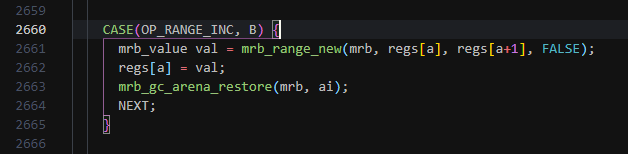
First prepare the debugging environment. mruby variables use a pointer-compression scheme resembling Chromium V8’s; see MRB_WORD_BOXING in the mruby documentation. This makes mruby values difficult to inspect in GDB, but the feature can be disabled at build time:
1
| export CFLAGS='-DMRB_NO_BOXING=1 -O0 -g' && make -j4
|
Build an mruby interpreter with debug information and set a GDB breakpoint at vm.c:2661. Enter any test flag, such as flag{whosyourdaddyISEEDEADPEOPLE10086}. I deliberately avoided sequential input such as 01234 or abcd, making it easier to distinguish XOR from addition, subtraction, multiplication, or division later.
Continue past the first breakpoint. The second stop corresponds to 091 OP_RANGE_INC R14. Inspect mrb->c->ci->stack[3], the contents of R3:
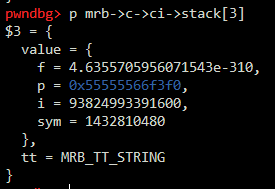
R3 has type MRB_TT_STRING. This string is the content variable—the 32 bytes we entered. Cast the p member of value to RString and inspect it more closely:
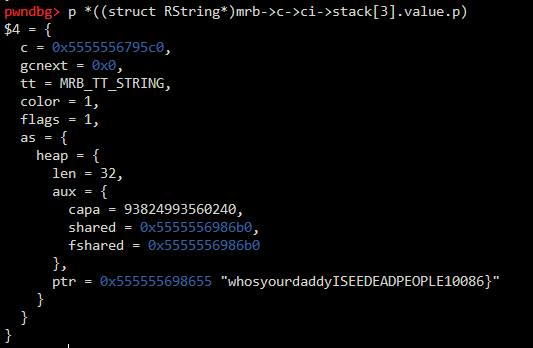
This reveals the location of the input. Continue into the loop and dump that memory after every iteration:
 1
 2
 3
 4
 5
 6
 7
 8
 9
10
11
12
13
14
15
16
17
18
19
20
21
22
23
24
25
26
27
28
29
30
31
32
33
34
35
36
37
38
39
40
41
| pwndbg> x/32xb ((struct RString*)mrb->c->ci->stack[3].value.p)->as.heap.ptr
0x555555698655: 0x77 0x68 0x6f 0x73 0x79 0x6f 0x75 0x72
0x55555569865d: 0x64 0x61 0x64 0x64 0x79 0x49 0x53 0x45
0x555555698665: 0x45 0x44 0x45 0x41 0x44 0x50 0x45 0x4f
0x55555569866d: 0x50 0x4c 0x45 0x31 0x30 0x30 0x38 0x36
# Convert alphanumeric ASCII characters to their corresponding indices.
0x555555698700: 0x3a 0x2b 0x32 0x36 0x3c 0x32 0x38 0x35
0x555555698708: 0x27 0x24 0x27 0x27 0x3c 0x12 0x1c 0x0e
0x555555698710: 0x0e 0x0d 0x0e 0x0a 0x0d 0x19 0x0e 0x18
0x555555698718: 0x19 0x15 0x0e 0x01 0x00 0x00 0x08 0x06
# content[0] ^= 1
0x555555698700: 0x3b 0x2b 0x32 0x36 0x3c 0x32 0x38 0x35
0x555555698708: 0x27 0x24 0x27 0x27 0x3c 0x12 0x1c 0x0e
0x555555698710: 0x0e 0x0d 0x0e 0x0a 0x0d 0x19 0x0e 0x18
0x555555698718: 0x19 0x15 0x0e 0x01 0x00 0x00 0x08 0x06
# content[1] ^= 2
# content[2] ^= 2^content[1]
0x555555698700: 0x3b 0x29 0x1b 0x36 0x3c 0x32 0x38 0x35
0x555555698708: 0x27 0x24 0x27 0x27 0x3c 0x12 0x1c 0x0e
0x555555698710: 0x0e 0x0d 0x0e 0x0a 0x0d 0x19 0x0e 0x18
0x555555698718: 0x19 0x15 0x0e 0x01 0x00 0x00 0x08 0x06
# content[3] ^= 4
# content[4] ^= 4^content[3]
# content[5] ^= 5^content[4]
0x555555698700: 0x3b 0x29 0x1b 0x32 0x0e 0x01 0x38 0x35
0x555555698708: 0x27 0x24 0x27 0x27 0x3c 0x12 0x1c 0x0e
0x555555698710: 0x0e 0x0d 0x0e 0x0a 0x0d 0x19 0x0e 0x18
0x555555698718: 0x19 0x15 0x0e 0x01 0x00 0x00 0x08 0x06
# content[6] ^= 7
# content[7] ^= 7^content[6]
# content[8] ^= 8^content[6]
# content[9] ^= 9^content[6]
0x555555698700: 0x3b 0x29 0x1b 0x32 0x0e 0x01 0x3f 0x0a
0x555555698708: 0x17 0x15 0x27 0x27 0x3c 0x12 0x1c 0x0e
0x555555698710: 0x0e 0x0d 0x0e 0x0a 0x0d 0x19 0x0e 0x18
0x555555698718: 0x19 0x15 0x0e 0x01 0x00 0x00 0x08 0x06
|
Although the logic is awkward to describe, the pattern is easy to see. Combined with the mruby bytecode analyzed earlier, the formula is straightforward to infer. The loop performs a series of XOR operations over groups of one, two, three, four, and progressively more bytes until it reaches the end of the array.
The following Python code recovers the original input:
 1
 2
 3
 4
 5
 6
 7
 8
 9
10
11
12
13
14
15
16
17
18
19
20
| a = [0x16, 0x27, 0x00, 0x35, 0x32, 0x16, 0x18, 0x15, 0x22, 0x21, 0x03, 0x1a, 0x1e, 0x1d, 0x3b, 0x1a,
0x2d, 0x38, 0x0e, 0x03, 0x28, 0x08, 0x28, 0x0e, 0x2e, 0x31, 0x39, 0x3e, 0x04, 0x1d, 0x15, 0x23]
s = '0123456789ABCDEFGHIJKLMNOPQRSTUVWXYZabcdefghijklmnopqrstuvwxyz'
v = 1
t = 1
l = 0
p = 0
while True:
a[p] ^= v
for i in range(l):
a[p+1+i] ^= (v+i)
a[p+1+i] ^= a[p]
v += t
t += 1
p += 1 + l
l += 1
if l > 6:
break
print('flag{{{}}}'.format(''.join(map(lambda x: s[x], a))))
|
flag: flag{Nbdn7YVDrt8PQOzAtZMQsUW7eszx4TLZ}
Conclusion
As a flexible scripting language, Ruby appears frequently in CTF competitions. One Ruby implementation, mruby, uses a register-based virtual machine and compiles Ruby code to mruby bytecode. Its compiler is relatively simple and does not perform optimizations such as copy elimination, so the generated bytecode remains highly readable. With a little patience, reconstructing the program’s logic is quite manageable.